---
title: Can I invite a guest to my Musiversal session?
description: Learn how to invite guests to a Musiversal session, join as a guest, and follow best practices to ensure a smooth remote recording experience.
---
[Skip to content](https://help.musiversal.com/can-i-invite-a-guest-to-my-musiversal-session#main-content)
English
Show submenu for translations
[Contact us](https://help.musiversal.com/kb-tickets/new?hsLang=en)
[](https://help.musiversal.com?hsLang=en)
- [Login](https://app.musiversal.com/login)
Open main navigation
Close main navigation
- [Login](https://app.musiversal.com/login)
- English
Show submenu for translations
- [Contact us](https://help.musiversal.com/kb-tickets/new)
- [musiversal.com](https://app.musiversal.com/)
[musiversal.com](https://app.musiversal.com/)
Advice and answers from Team Musiversal
- There are no suggestions because the search field is empty.
1. [Help Center](https://help.musiversal.com/?hsLang=en)
2. [Navigation](https://help.musiversal.com/navigation?hsLang=en)
# Can I invite a guest to my Musiversal session?
## You can invite friends and collaborators to your session directly through the platform, in just a few simple steps
**In this article, you'll learn about:**
- [How to invite a guest to a Musiversal session](https://help.musiversal.com/can-i-invite-a-guest-to-my-musiversal-session#how-to-invite)
- [How to receive an invite and join a session, as a guest](https://help.musiversal.com/can-i-invite-a-guest-to-my-musiversal-session#how-to-receive)
- [Guidelines for guests before joining a session](https://help.musiversal.com/can-i-invite-a-guest-to-my-musiversal-session#guidelines-for-guests)
---
#### How to invite a guest to a Musiversal session
1\. From the [Sessions area](https://app.musiversal.com/my-sessions), click the session you want to invite a guest for
2\. Click on the "**Invite Guests**" button, at the bottom of the session details on the right side of the session's view
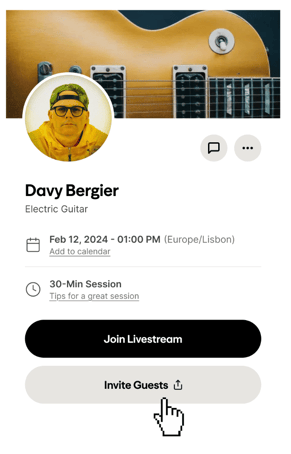
3\. Write the your guests' emails in the invite modal, **clicking "enter" to validate them**. You can invite up to 3 guests
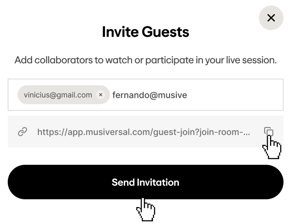
4\. Click on "**Send Invitation**" when you're done. You can also copy the link to share it externally right above the button
5\. **Important**: Let the musician know in the messages that you'll have guests over, so that they expect and admit them to the session
[⬆️](https://help.musiversal.com/can-i-invite-a-guest-to-my-musiversal-session#index)
#### How to receive an invite and join a session, as a guest
1\. Receive the invite in your inbox with all the necessary details
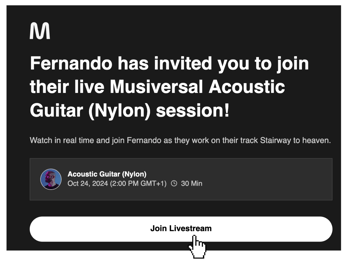
2\. Click on "Join Livestream" to open the session's page, where you'll be able to join from when it's time
3\. If you were only sent a link to join, you'll see the session's page directly when you open it
[⬆️](https://help.musiversal.com/can-i-invite-a-guest-to-my-musiversal-session#index)
#### Guidelines for guests before joining a session
We're excited to have you aboard!
- **Watch [this video](https://help.musiversal.com/user-guide-start-here#:~:text=Here%E2%80%99s%20a%20quick%20peek%20at%20what%20a%20typical%20recording%20session%20looks%20like%20%E2%8F%AC) to get familiar with what a remote recording session looks like**, so you know what to expect from the experience
- **Sessions take place via Muse:**
- It works like a video call, with the added benefit of streaming high quality audio from the musician.
- No download is required. The session link opens directly in your browser.
- We recommend **taking a few minutes before the session to review the setup tips and best practices included [in this article](https://help.musiversal.com/how-to-join-your-session-with-muse?hsLang=en),** to ensure everything runs smoothly.
- **Be on time.** Musicians typically start recording within 5 minutes of the session start time, so make sure you are ready to be admitted into the call.
- **Keep your microphone muted.** You are welcome to greet and share comments when appropriate, but please keep your microphone muted during recording to avoid interruptions
[⬆️](https://help.musiversal.com/can-i-invite-a-guest-to-my-musiversal-session#index)
**Your Music, No Limits**
****
---
Need help? [**Contact us**](https://share.hsforms.com/18FoFHA41TZ-c-Dku-Wpcpg4zn1a?__hstc=22948580.9302ec79d587ed6081cc6b19224041ae.1721290077990.1774885778441.1774898743564.908&__hssc=22948580.3.1774898743564&__hsfp=e15b9b0f0ef643f36aff528fb4f25215&)to get personalized support.
- [Sessions](https://help.musiversal.com/sessions?hsLang=en)
- [Memberships](https://help.musiversal.com/memberships?hsLang=en)
- [Support](https://help.musiversal.com/support?hsLang=en)
- [Production Services](https://help.musiversal.com/production-services?hsLang=en)
- [Promotion Services](https://help.musiversal.com/promotion-services?hsLang=en)
- [Navigation](https://help.musiversal.com/navigation?hsLang=en)
- [Artists](https://help.musiversal.com/artists?hsLang=en)
- [Billing & Payments](https://help.musiversal.com/billing-payments?hsLang=en)
- [Quality & Rights](https://help.musiversal.com/quality-rights?hsLang=en)
- [Tutorials](https://help.musiversal.com/tutorials?hsLang=en)
- [Orchestras](https://help.musiversal.com/orchestras?hsLang=en)
- [Others](https://help.musiversal.com/others?hsLang=en)
- [Login](https://app.musiversal.com/login)
[](https://www.musiversal.com/)
Help Center
Copyright © 2026, Musiversal, Inc