---
title: Managing your sessions
description: "A quick guide to managing your bookings after they're made: editing sessions, cancelling, rescheduling, and archiving Tracks."
---
[Skip to content](https://help.musiversal.com/managing-your-sessions#main-content)
English
Show submenu for translations
[Contact us](https://help.musiversal.com/kb-tickets/new?hsLang=en)
[](https://help.musiversal.com?hsLang=en)
- [Login](https://app.musiversal.com/login)
Open main navigation
Close main navigation
- [Login](https://app.musiversal.com/login)
- English
Show submenu for translations
- [Contact us](https://help.musiversal.com/kb-tickets/new)
- [musiversal.com](https://app.musiversal.com/)
[musiversal.com](https://app.musiversal.com/)
Advice and answers from Team Musiversal
- There are no suggestions because the search field is empty.
1. [Help Center](https://help.musiversal.com/?hsLang=en)
2. [Navigation](https://help.musiversal.com/navigation?hsLang=en)
# Managing your sessions
## Something changed? Learn how to edit and manage your sessions
**In this article, you'll learn how to:**
- - [Edit a session](https://help.musiversal.com/managing-your-sessions#editsession)
- [Delete files](https://help.musiversal.com/managing-your-sessions#editfiles)
- [Cancel or reschedule a session](https://help.musiversal.com/managing-your-sessions#cancelreschedule)
- [Archive a Track](https://help.musiversal.com/managing-your-sessions#archivetrack)
Haven't booked yet? Book your first session with [this article](https://help.musiversal.com/what-is-a-session-and-how-do-sessions-work?hsLang=en)
---
#### Edit a session
1\. From the [Sessions area](https://app.musiversal.com/my-sessions), go to the session
2\. **Edit Track**: InTrack's section, change it or edit it, by selecting the options:

3\. **Edit and delete Files**: In the Files' section, go to **Browse files**

You can delete files with the bin icon, or deselect one and add another by checking or unchecking the boxes

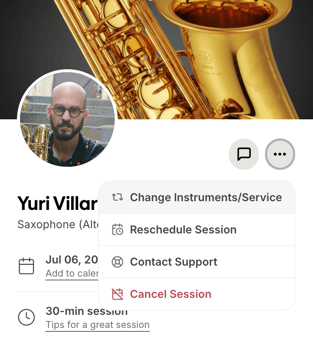
**Other edits:**
- Change **attendance** at the top

- Change the **instrument** or service
[⬆️](https://help.musiversal.com/managing-your-sessions#index)
---
#### Cancel or reschedule a session
1\. From the [Sessions area](https://app.musiversal.com/my-sessions), go to the session
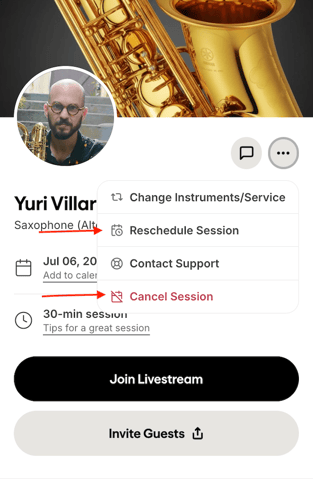
2\. Look for the session details, and select the 3 dot menu at the top
- - To **reschedule**, select the option, and grab a new slot from the calendar
- To **cancel**, select the option, and confirm
[⬆️](https://help.musiversal.com/managing-your-sessions#index)
---
#### Archive a Track
If you no longer need a Track, you can Archive it directly from your [Tracks area](https://app.musiversal.com/my-tracks).
When archived, a Track will not show up as an option to add it to sessions, or select its files. You can unarchive Tracks any time time you need.
**[⬆️](https://help.musiversal.com/managing-your-sessions#index)**
**Your Music, No Limits**
****
---
Need help? [**Contact us**](https://share.hsforms.com/18FoFHA41TZ-c-Dku-Wpcpg4zn1a?__hstc=22948580.9302ec79d587ed6081cc6b19224041ae.1721290077990.1753366009566.1753374634410.535&__hssc=22948580.2.1753374634410&__hsfp=2819802059)to get personalized Support.
- [Sessions](https://help.musiversal.com/sessions?hsLang=en)
- [Memberships](https://help.musiversal.com/memberships?hsLang=en)
- [Support](https://help.musiversal.com/support?hsLang=en)
- [Production Services](https://help.musiversal.com/production-services?hsLang=en)
- [Promotion Services](https://help.musiversal.com/promotion-services?hsLang=en)
- [Navigation](https://help.musiversal.com/navigation?hsLang=en)
- [Artists](https://help.musiversal.com/artists?hsLang=en)
- [Billing & Payments](https://help.musiversal.com/billing-payments?hsLang=en)
- [Quality & Rights](https://help.musiversal.com/quality-rights?hsLang=en)
- [Tutorials](https://help.musiversal.com/tutorials?hsLang=en)
- [Orchestras](https://help.musiversal.com/orchestras?hsLang=en)
- [Others](https://help.musiversal.com/others?hsLang=en)
- [Login](https://app.musiversal.com/login)
[](https://www.musiversal.com/)
Help Center
Copyright © 2026, Musiversal, Inc