---
title: "Your first session: a step-by-step guide"
description: Learn what is a session, and how you can navigate the platform through them
---
[Skip to content](https://help.musiversal.com/what-is-a-session-and-how-do-sessions-work#main-content)
English
Show submenu for translations
[Contact us](https://help.musiversal.com/kb-tickets/new?hsLang=en)
[](https://help.musiversal.com?hsLang=en)
- [Login](https://app.musiversal.com/login)
Open main navigation
Close main navigation
- [Login](https://app.musiversal.com/login)
- English
Show submenu for translations
- [Contact us](https://help.musiversal.com/kb-tickets/new)
- [musiversal.com](https://app.musiversal.com/)
[musiversal.com](https://app.musiversal.com/)
Advice and answers from Team Musiversal
- There are no suggestions because the search field is empty.
1. [Help Center](https://help.musiversal.com/?hsLang=en)
2. [Sessions](https://help.musiversal.com/sessions?hsLang=en)
# Your first session: a step-by-step guide
## From first booking to joining your session
**In this article, you'll learn how to:**
- - [Book a session](https://help.musiversal.com/what-is-a-session-and-how-do-sessions-work#Booksession)
- [Create a Track](https://help.musiversal.com/what-is-a-session-and-how-do-sessions-work#createtrack)
- [Add your files](https://help.musiversal.com/what-is-a-session-and-how-do-sessions-work#addfiles)
- [Join your session](https://help.musiversal.com/what-is-a-session-and-how-do-sessions-work#joinsessions)
- More sessions, longer sessions, sooner sessions. Learn how to book them [here](https://help.musiversal.com/getting-more-from-your-bookings?hsLang=en)
- Something changed? Learn how to edit, cancel, or reschedule your session [here](https://help.musiversal.com/managing-your-sessions?hsLang=en)
---
#### Book a session
1\. Find the calendars in a [Musician's profile](https://app.musiversal.com/explore), or in a [Service/Instrument page](https://app.musiversal.com/explore/:category_type). You can also search for musicians or services by typing them on the search bar at the top
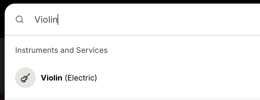
2\. Select the slot you want, and confirm the booking.
[⬆️](https://help.musiversal.com/what-is-a-session-and-how-do-sessions-work#index)
---
#### Create a Track
To get started, you'll need to create and add a Track for your session. A Track holds your song's basic details (name, BPM, genre) and all associated files, and every session is linked to one. **After creating the Track, you'll unlock the possibility to add files to your session.**
1\. From your [Sessions area](http://app.musiversal.com/my-sessions), enter the session
2\. Select **Add Track** → **New Track**
3\. Enter the necessary information\* and hit **Create Track**
\*the only mandatory field is the Track name
Tip: You can always check all your Tracks and the sessions linked to them in [My Tracks](https://app.musiversal.com/my-tracks)
**[⬆️](https://help.musiversal.com/what-is-a-session-and-how-do-sessions-work#index)**
---
#### Add your files
All sessions need pre-session materials. Check the file requirements for each service or instrument in the each [Service/Instrument page.](https://app.musiversal.com/explore/:category_type)Learn more about materials in [this article](https://help.musiversal.com/preparing-your-materials-ahead-of-a-session?hsLang=en).
1\. From your [Sessions area](http://app.musiversal.com/my-sessions), enter the session
2\. Select **Add Audio/Written Files** → **Upload Files**
3\. Upload the files from your device
4\. Check in the boxes and select **Add Files to Session**
Already worked on this Track before? Your files from past sessions will be available to add to new ones.
**[⬆️](https://help.musiversal.com/what-is-a-session-and-how-do-sessions-work#index)**
---
#### Join your session
**Learn more about Muse (the software we use to stream the sessions) [here](https://help.musiversal.com/how-to-join-your-session-with-muse?hsLang=en).**
1\. When it's time, go to your [Sessions area](https://app.musiversal.com/my-sessions) and click **Join Session Now!**
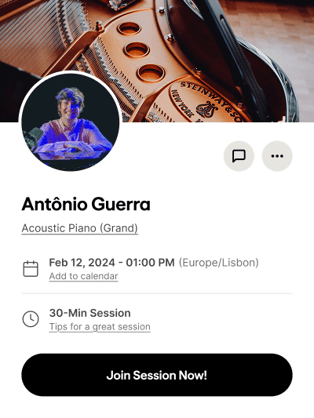
2\. If you want to invite a friend to witness the session, learn how to do it [here](https://help.musiversal.com/can-i-invite-a-guest-to-my-musiversal-session?hsLang=en)
**What if you can't make it, or you're running late?**
If you've submitted your files, your musician will record without you. If you haven't submitted files, they'll wait up to 15 minutes from the start time. If you don't show up and there are no files, the session will be considered finished with no deliverables.
If your files were submitted but are incomplete or unclear, your musician may reach out for clarification. If they don't hear from you within 15 minutes of start time, the session may close without deliverables.
**[⬆️](https://help.musiversal.com/what-is-a-session-and-how-do-sessions-work#index)**
**Your Music, No Limits**
****
---
Need help? [**Contact us**](https://share.hsforms.com/18FoFHA41TZ-c-Dku-Wpcpg4zn1a?__hstc=22948580.9302ec79d587ed6081cc6b19224041ae.1721290077990.1753366009566.1753374634410.535&__hssc=22948580.2.1753374634410&__hsfp=2819802059) to get personalized Support.
- [Sessions](https://help.musiversal.com/sessions?hsLang=en)
- [Memberships](https://help.musiversal.com/memberships?hsLang=en)
- [Support](https://help.musiversal.com/support?hsLang=en)
- [Production Services](https://help.musiversal.com/production-services?hsLang=en)
- [Promotion Services](https://help.musiversal.com/promotion-services?hsLang=en)
- [Navigation](https://help.musiversal.com/navigation?hsLang=en)
- [Artists](https://help.musiversal.com/artists?hsLang=en)
- [Billing & Payments](https://help.musiversal.com/billing-payments?hsLang=en)
- [Quality & Rights](https://help.musiversal.com/quality-rights?hsLang=en)
- [Tutorials](https://help.musiversal.com/tutorials?hsLang=en)
- [Orchestras](https://help.musiversal.com/orchestras?hsLang=en)
- [Others](https://help.musiversal.com/others?hsLang=en)
- [Login](https://app.musiversal.com/login)
[](https://www.musiversal.com/)
Help Center
Copyright © 2026, Musiversal, Inc
```json
{
"@context" : "https://schema.org",
"@type" : "VideoObject",
"contentUrl" : "https://8381278.fs1.hubspotusercontent-na1.net/hubfs/8381278/video_assets/212960148842/inherited/web_optimized.mp4",
"dateModified" : "2026-05-15T17:27:39.038Z",
"duration" : "PT22S",
"height" : 1080,
"name" : "Booksession2026",
"thumbnailUrl" : "https://8381278.fs1.hubspotusercontent-na1.net/hubfs/8381278/Booksession2026.mp4/medium.jpg",
"uploadDate" : "2026-05-15T15:12:36.538Z",
"width" : 1992
}
```
```json
{
"@context" : "https://schema.org",
"@type" : "VideoObject",
"contentUrl" : "https://8381278.fs1.hubspotusercontent-na1.net/hubfs/8381278/video_assets/212960179046/inherited/web_optimized.mp4",
"dateModified" : "2026-05-15T17:28:01.968Z",
"duration" : "PT22S",
"height" : 1080,
"name" : "Addtrack2026",
"thumbnailUrl" : "https://8381278.fs1.hubspotusercontent-na1.net/hubfs/8381278/Addtrack2026.mp4/medium.jpg",
"uploadDate" : "2026-05-15T15:12:36.283Z",
"width" : 1956
}
```
```json
{
"@context" : "https://schema.org",
"@type" : "VideoObject",
"contentUrl" : "https://8381278.fs1.hubspotusercontent-na1.net/hubfs/8381278/video_assets/212960179047/inherited/web_optimized.mp4",
"dateModified" : "2026-05-15T17:28:25.330Z",
"duration" : "PT23S",
"height" : 1080,
"name" : "addfiles2026",
"thumbnailUrl" : "https://8381278.fs1.hubspotusercontent-na1.net/hubfs/8381278/addfiles2026.mp4/medium.jpg",
"uploadDate" : "2026-05-15T15:12:36.334Z",
"width" : 1940
}
```