
In this article, you'll learn how to:
-
Need to change a session that's already booked? Head over to Managing your sessions
-
Haven't booked yet? Book your first session with this article
Book a longer session
Longer sessions are made up of up to 4 consecutive slots. Use them when you're working on a longer track, want multiple takes of the same piece, or need more back-and-forth time with your artist.
1. From the calendar, set the session length at the top and click on "View sessions"
2. Select the slot, and confirm the booking
A few things to keep in mind:
- Each slot counts as a separate active booking within your plan's booking max.
- You can combine slots with top-ups if you've reached your max.
- If you want to record multiple tracks, book one session per track.
Book a session with top-ups
If you have reached your active booking limit and need to book a session, or need to extend one, you can purchase individual top-ups.
1. From the calendar, select the slot you want and follow the steps to get a top-up
2. Select your payment method and confirm the checkout and booking
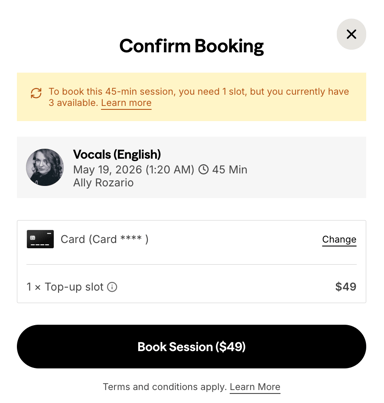
3. To build a longer session with top-ups: if you have 1 slot available and want a 3-slot session, you'll need 2 top-ups.
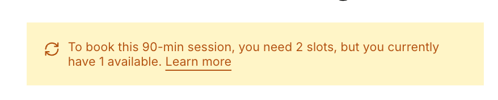
A few things to keep in mind:
-
This allows you to go over your active booking limit for a single new booking only. After that booking is made, your limit will return to normal, even if that session hasn’t happened yet.
-
Invoices for top-up purchases are available directly in the session view, from your Sessions area.
Top-ups rescheduling, cancellations and refunds
- You can cancel a top-up session at any time.
- You can reschedule at least 48 hours before the session's start time.
- You'll be automatically refunded if you cancel at least 48 hours in advance, following the regular cancellation steps.
- If your subscription is set to cancel or pause and you have a top-up session booked after that date, it will be automatically cancelled and the same refund conditions apply.
Book a Fast Lane session
Need a session sooner than your plan normally allows? Fast Lane lets you book slots in the 6 to 72 hour window, earlier than your regular booking range, for a small additional fee.
1. From the calendar, select the slot with the Fast Lane icon
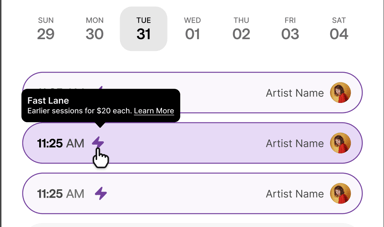
2. Select your payment method and confirm the checkout and booking
FAQs
-
Why am I being charged a Fast Lane fee?
You're booking a session that falls within the Fast Lane window, earlier than your plan's regular booking range (Fast Lane is free for the first month of your membership)
-
How can I avoid the Fast Lane fee?
Book sessions that start more than 72 hours from now.
-
Do add-ons trigger a Fast Lane fee?
No. Add-ons have fixed pricing and are not affected. -
Can I use top-ups with Fast Lane?
Yes. If both apply, you'll see both charges at checkout.
Your Music, No Limits

Need help? Contact us to get personalized Support.